

LogicTruss
See every serialized reference in your Unity project — including the ones a path search
cannot reach. LogicTruss maps dependencies, UnityEvent wiring and
[SerializeReference] managed references across scenes, prefabs,
ScriptableObjects and sub-assets; audits project health; and shows you the graph behind
the answer.
Editor-only · Unity 2022.3+ · Read-only, deterministic, offline · Windows, macOS & Linux
LogicTruss builds a local dependency graph of your project and lets you interrogate it.
It is not a reference finder with a longer result list. It reads the places Unity actually
stores wiring — serialized properties, nested prefab overrides, sub-assets,
UnityEvent persistent calls and [SerializeReference]
managed-reference graphs — and it shows you the structure, not just a list of files.
Where it looks. Scenes, prefabs (including variants and
nested prefabs), ScriptableObjects, components, assets and sub-assets. Reachability is
computed from roots you configure: build scenes, Resources/, Addressables
entries when that package is installed, and manual roots.
See it in action
About 40 seconds, silent and captioned — opening the window, a scan with its progress strip, the dashboard filling in, the graph, an audit finding opened from All Issues, a what references this? query, and an export landing on disk.
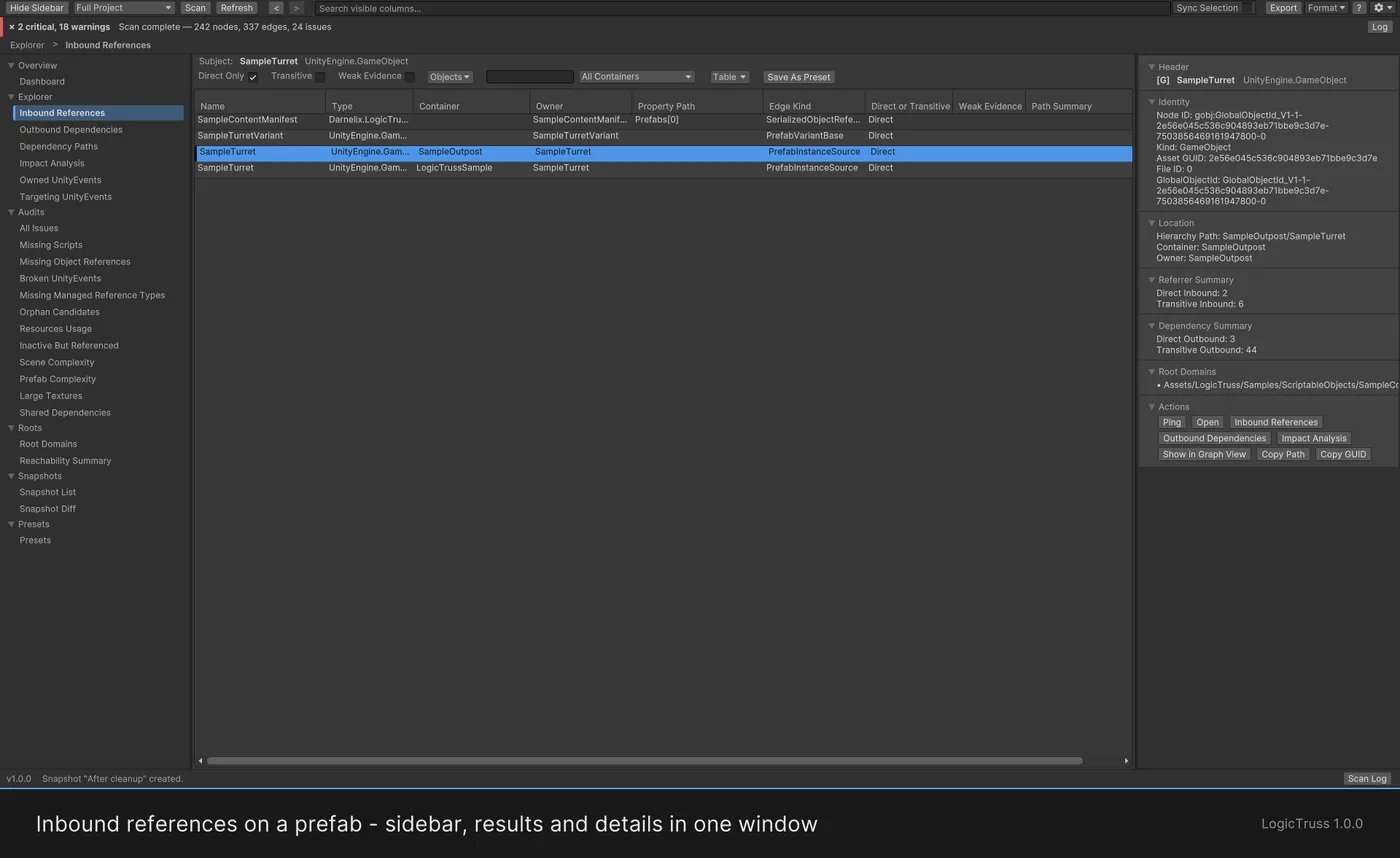
One integrated window
Dashboard, tables, graph and details in three panes. The window remembers your layout — splitter widths, sidebar state, last page, per-page view mode, and each page's column visibility, widths, order and sort — with a location breadcrumb, back and forward history, and a Reset Layout command when you want to start over.
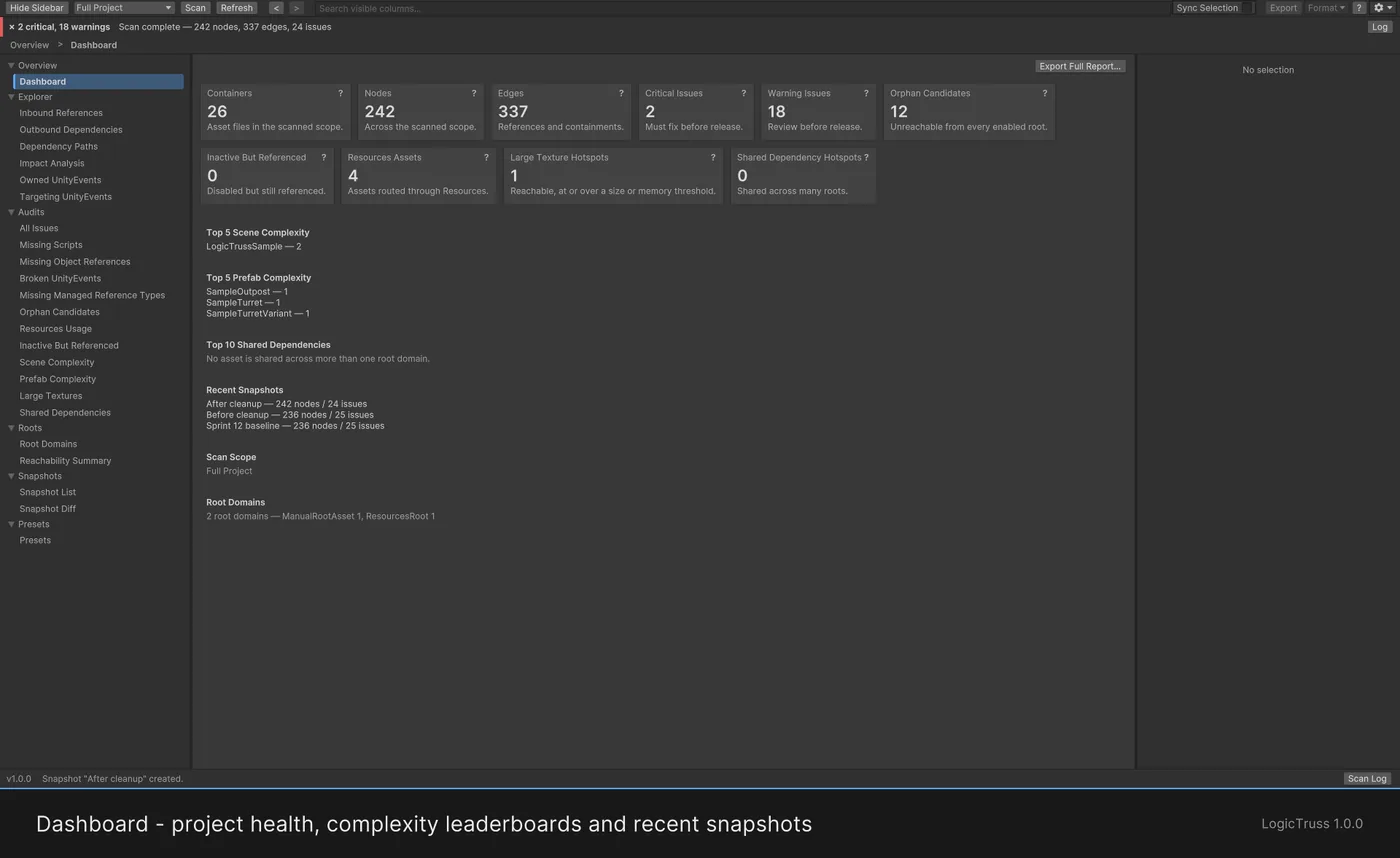
A dashboard that summarises the project
After a scan, one page sums it up: the graph's size, critical and warning counts,
orphan candidates, inactive-but-referenced objects, Resources/ assets,
large-texture and shared-dependency hotspots, scene and prefab complexity leaderboards,
recent snapshots, and the scope and roots the numbers were measured against. Most cards
open the page that answers them, and Export Full Report… writes the
whole project to Markdown or JSON.
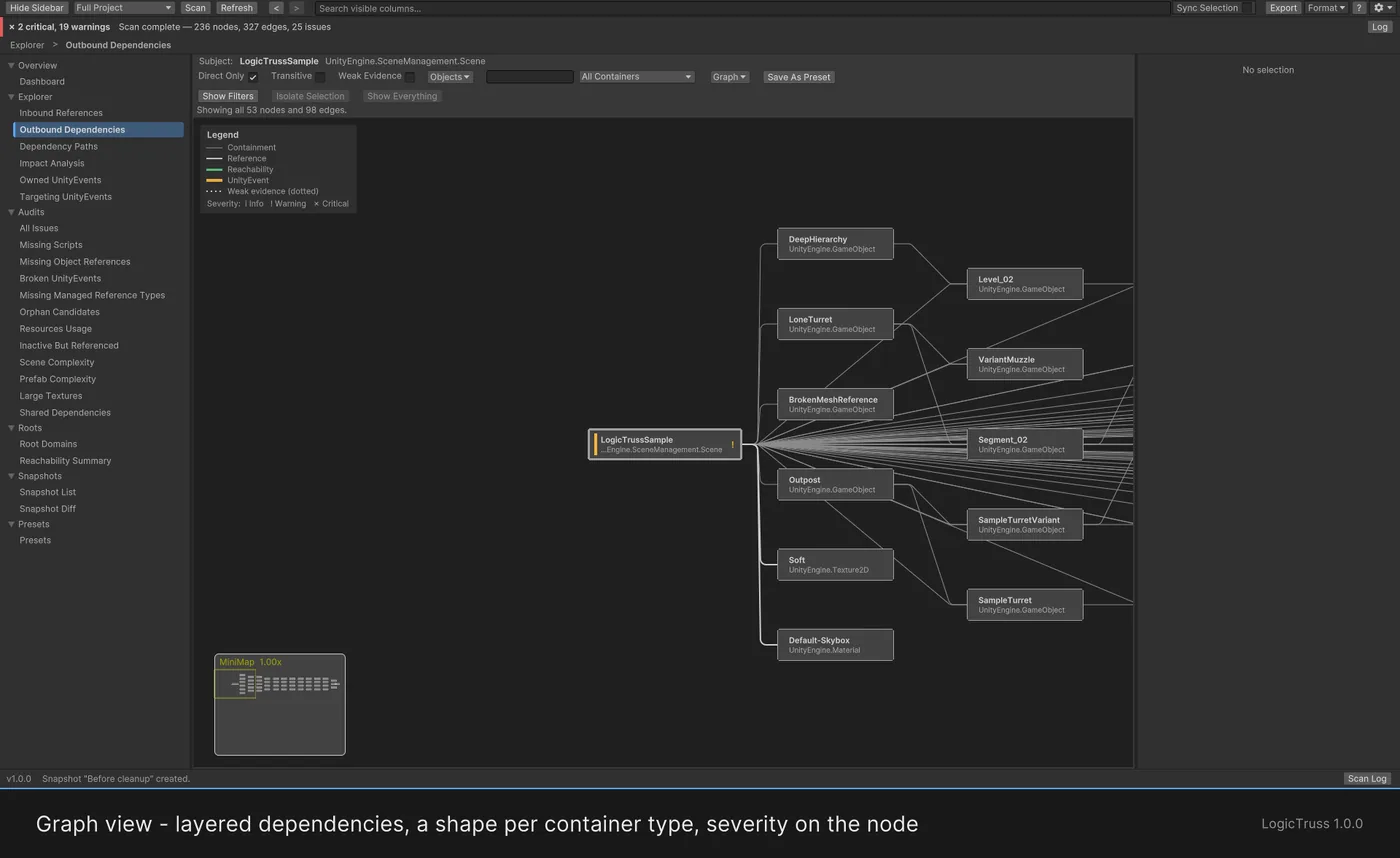
An interactive dependency graph
Any Explorer result can be shown as a graph instead of a table: a layered layout, a shape per container type, severity on the border and as a glyph, edge styles by kind, and a minimap. Zoom, pan, frame and centre on a selection, click to sync, double-click to open. A display cap keeps a huge result from freezing the editor — and says so, rather than silently truncating.
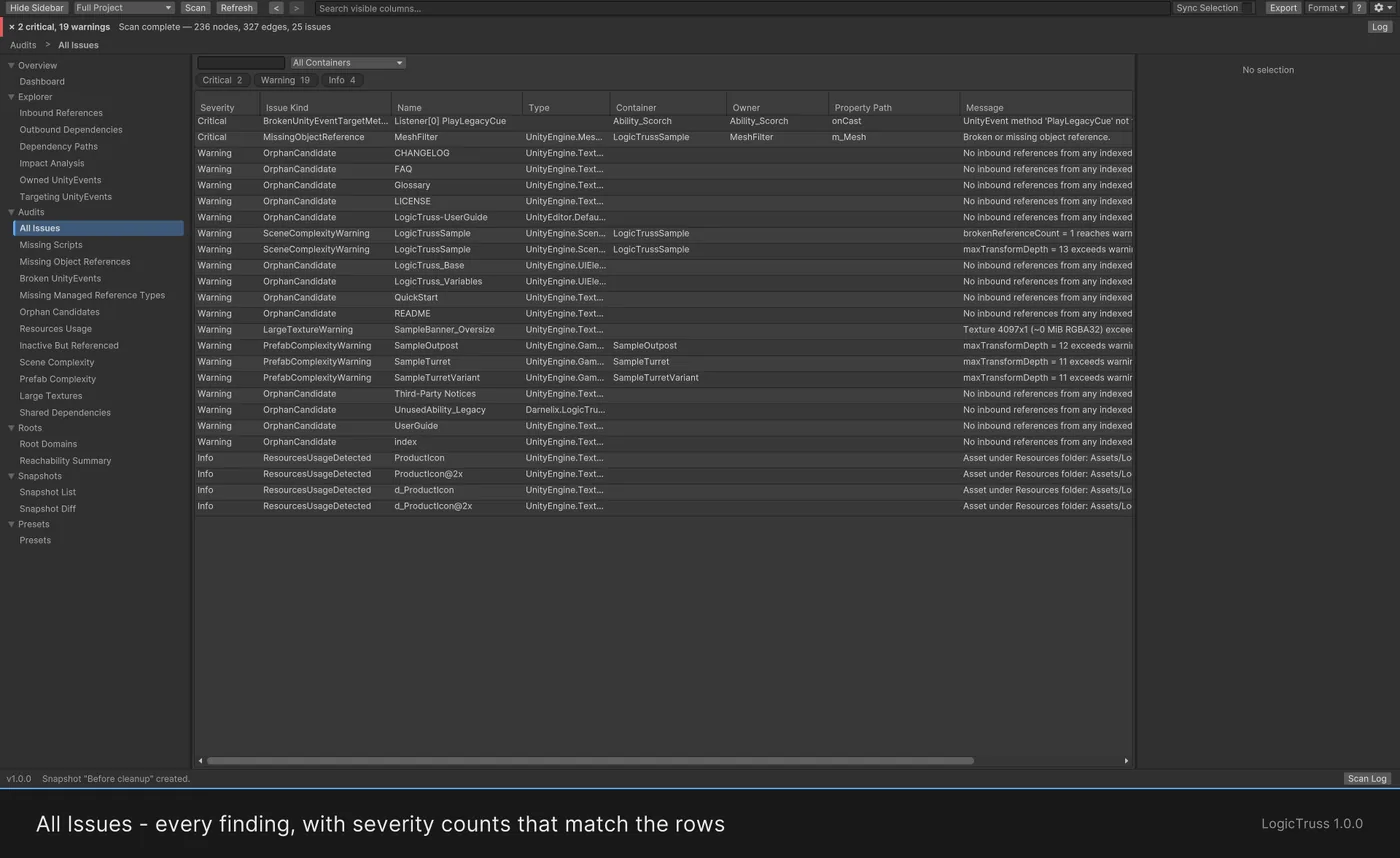
Thirteen audit pages
All Issues gathers every finding in one place, with severity chip counts
that match the rows. Beside it: missing scripts, missing object references, broken
UnityEvents, missing managed-reference types, orphan candidates, Resources/
usage, Addressables Overview (when the package is installed), inactive-but-referenced,
scene complexity, prefab complexity, large textures and shared dependencies. Thresholds
are settings, and changing one is honoured by the next result you see.
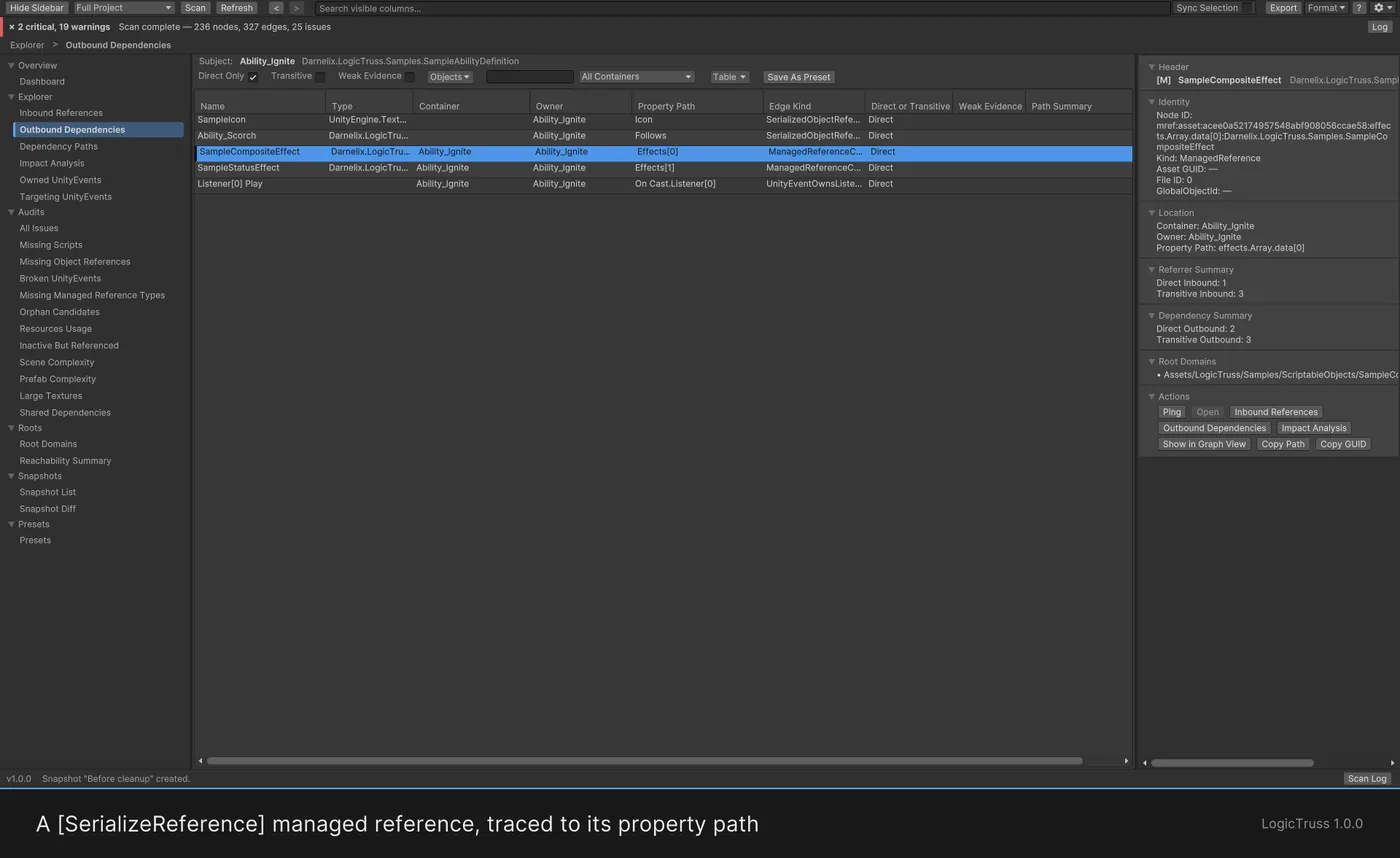
Trace [SerializeReference] managed references
The graph other reference tools do not walk. Managed references are first-class nodes and edges: every query page shows them with the property path they sit under, and the Missing Managed Reference Types audit lists the ones whose type no longer exists.
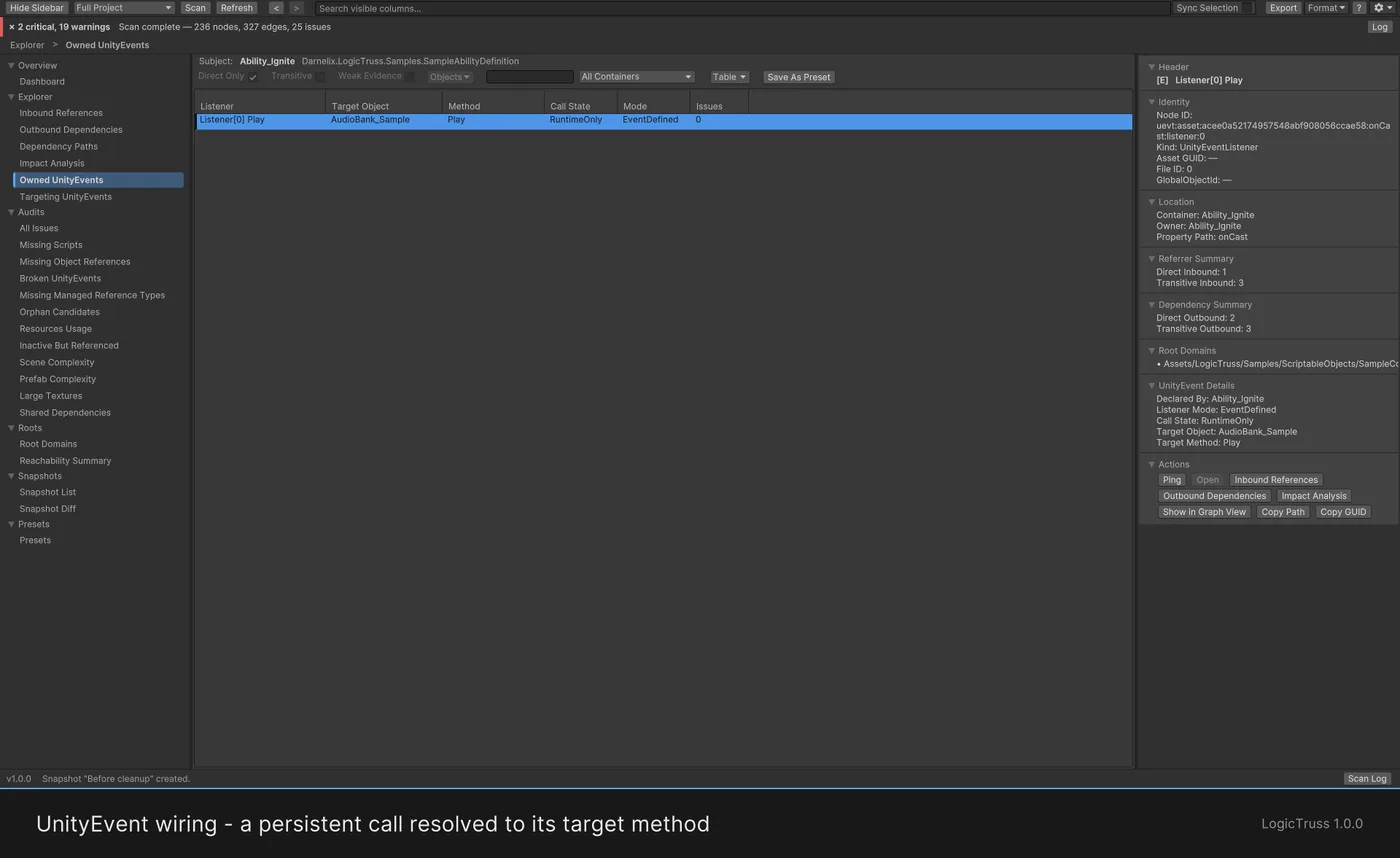
Follow UnityEvent wiring project-wide
Owned UnityEvents shows the events a thing declares and what every persistent call targets — object, method, call state. Targeting UnityEvents turns it around and shows which events point at it. Calls whose target or method no longer resolves land on the Broken UnityEvents audit page.
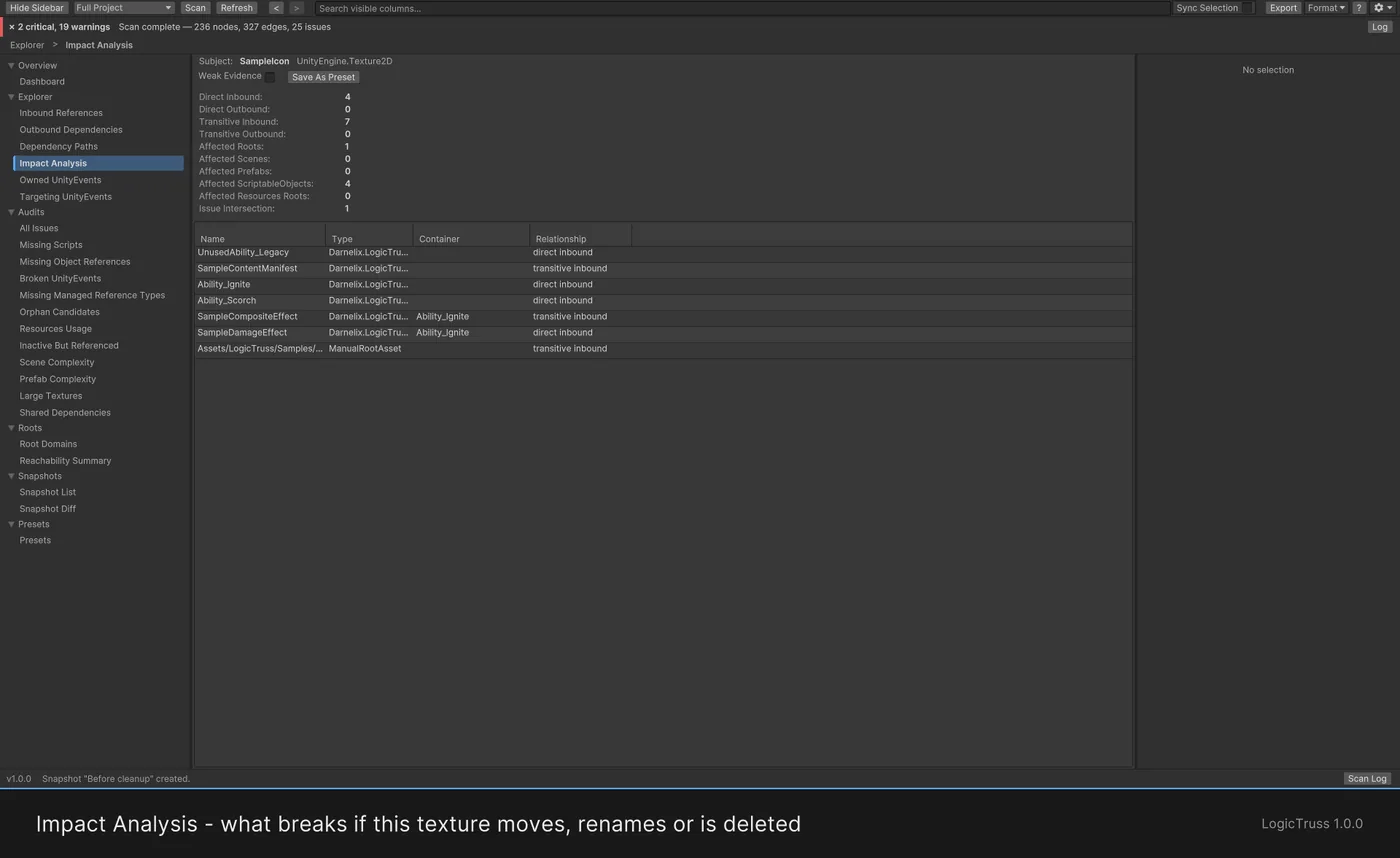
Ask the four refactor questions
Inbound References — what references this? Outbound Dependencies — what does this depend on? Dependency Paths — what path connects these two things? Impact Analysis — what breaks if I move, rename or delete this? Each page's controls switch between direct and transitive, objects and occurrences, and any setup can be saved as a preset beside the built-in ones.
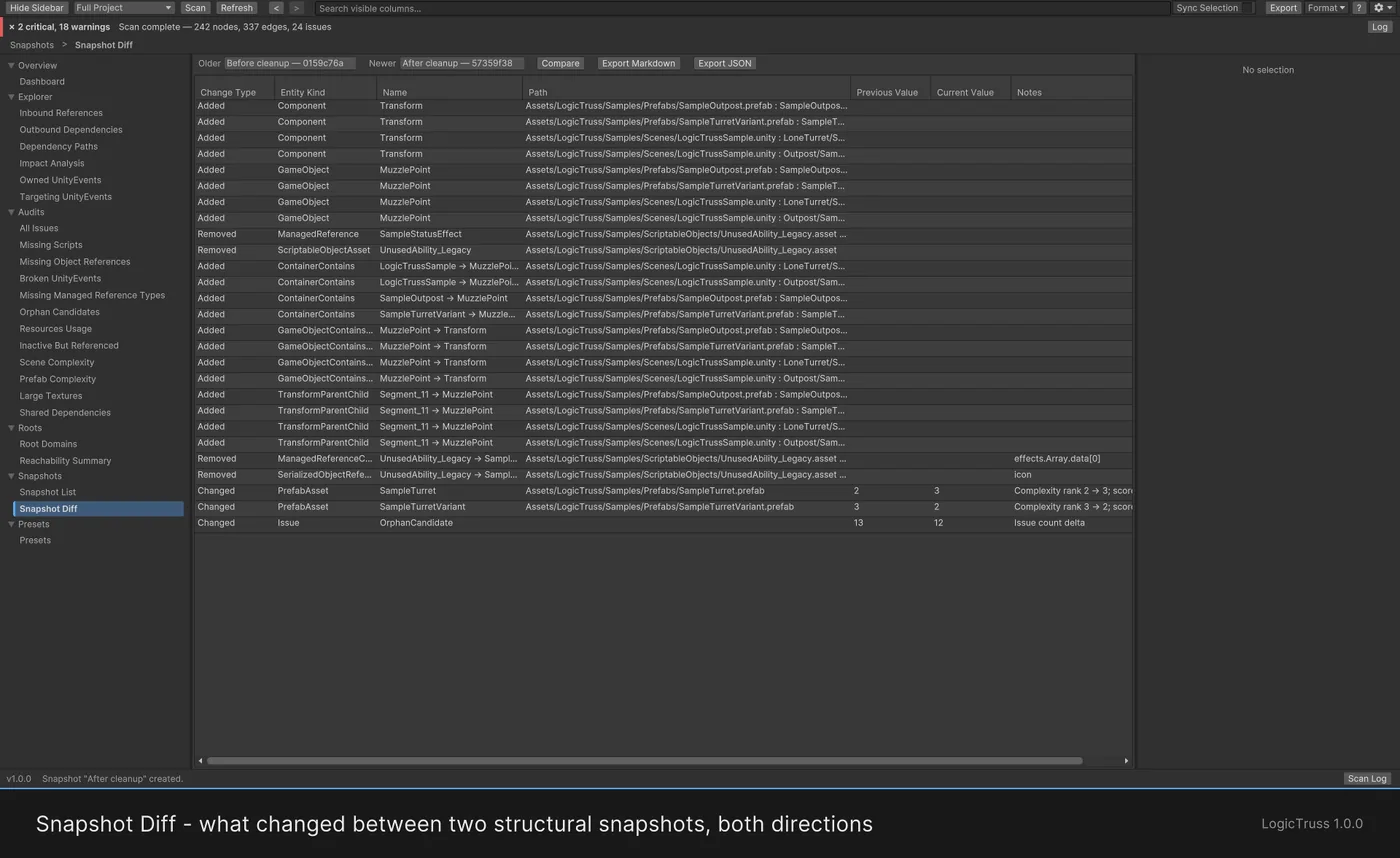
Structural snapshots and an eight-mode diff
Take a snapshot of the graph, its issues and its counts — with a label and a note, under a retention policy you set — and diff any two: nodes and edges added and removed, issue-count changes, orphan changes, complexity-ranking changes and shared-dependency changes. The diff exports to Markdown or JSON, and a snapshot from a different schema version is named as such rather than misread.
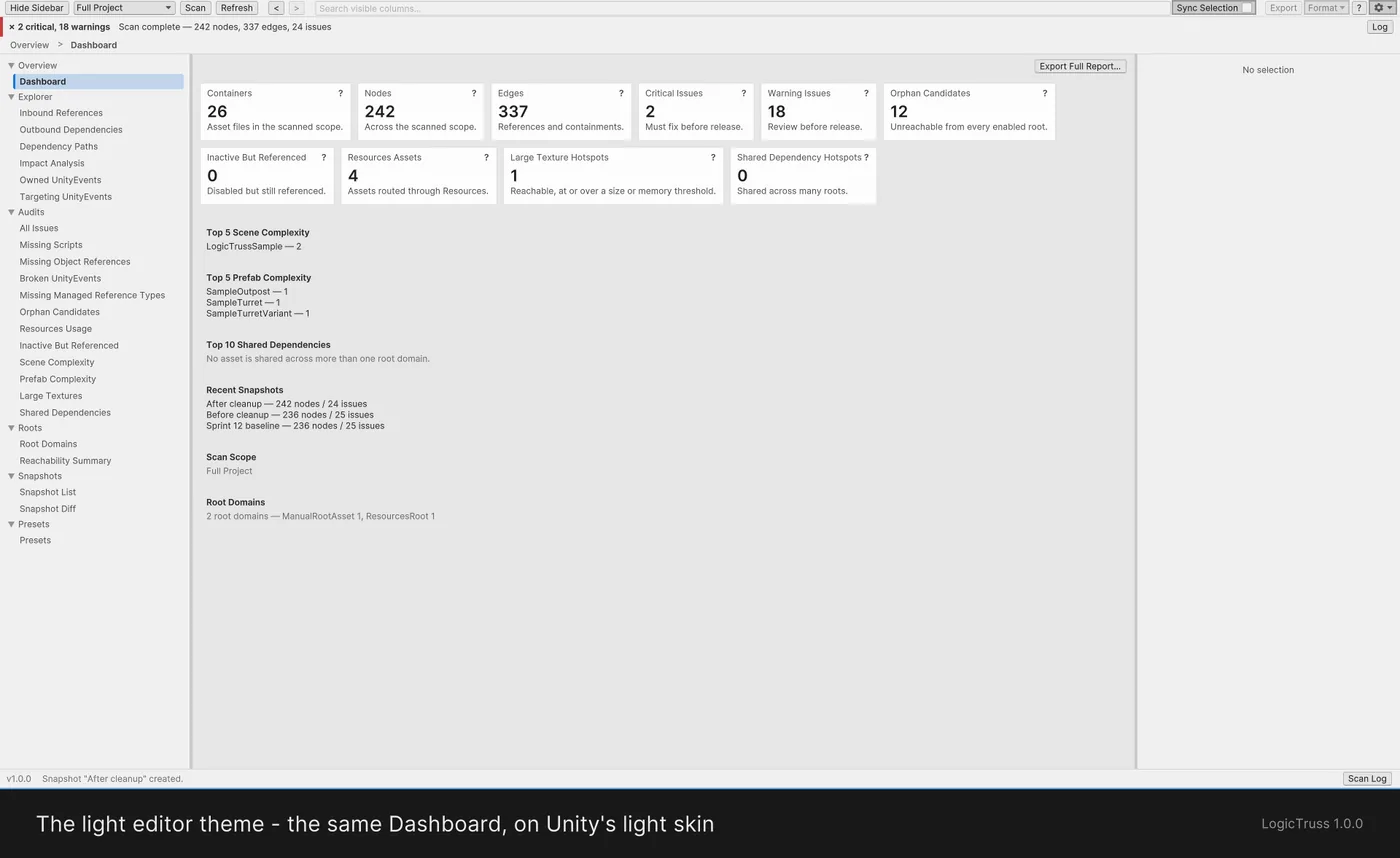
Both themes, keyboard throughout
Both editor themes, with a live switch that reaches an open window, and no state communicated by colour alone. Every page is keyboard-operable, with shortcuts rebindable in Unity's own Shortcut Manager. Selection syncs with the Project and Hierarchy windows, and Analyze in LogicTruss on a right-click lands you on the row for the thing you clicked.
The questions it answers, and the page that answers each
Every page is a query over the same index. Scan once, then ask.
| Question | Page |
|---|---|
| What references this? | Inbound References |
| What does this depend on? | Outbound Dependencies |
| What path connects these two things? | Dependency Paths |
| What breaks if I move, rename, or delete this? | Impact Analysis |
| What UnityEvents are wired here, and what do they target? | Owned UnityEvents · Targeting UnityEvents |
| What is unreachable from anything that ships? | Orphan Candidates · Reachability Summary |
| What is structurally risky? | Scene Complexity · Prefab Complexity |
| What is oversized and still actually used? | Large Textures |
| What is shared broadly enough to become a maintenance or distribution hotspot? | Shared Dependencies |
| What changed since last time? | Snapshots · Snapshot Diff |
Nothing is called an orphan without saying which root set it was measured against, and a partial-scope scan is labelled as partial everywhere its results appear.
The trust contract
This is the part that decides whether an audit tool is usable at all. Each of the four is enforced by a test in the product's EditMode suite rather than by a sentence on this page.
-
Read-only. Scanning never modifies your project. The only writes are the tool's own cache under
Library/and its settings asset underProjectSettings/. -
Deterministic. The same project produces the same index, the same ordering and the same export — byte for byte, excluding declared timestamp fields.
-
Offline. No network calls, no account, no telemetry, no phone-home. Not a setting: an absence.
-
Editor-only. No runtime assembly, no components in your scenes, nothing in your build.
What LogicTruss is not
Stated plainly, because a tool in this category is judged on where its answers stop.
-
Not a C# static code analyzer, not a runtime debugger, not a build-size profiler.
-
It reads serialized and editor-side metadata. It does not infer references made in code at runtime —
Resources.Load("some/path"), reflection subscriptions, code-generated Addressables keys, or anything acquired over the network. Where the evidence is weak, the tool labels it weak rather than guessing. -
It never fixes anything by itself. Scanning is read-only, and there is no mass-repair command.
Who it is built for
Gameplay programmers mid-refactor. Run Impact Analysis on the thing you are about to move, rename or delete, and read what breaks — direct and transitive — before you do it.
Leads running a pre-release audit. All Issues in one table, orphan candidates each with the reason they were judged unreachable, and complexity and large-texture findings scored against thresholds you set.
Designers and technical artists wiring gameplay through
serialized data. See every UnityEvent an asset owns or is targeted by, and
every [SerializeReference] chain, with the property path it lives under.
Small teams cleaning up, with a record. Snapshot before, snapshot after, diff the two, and export the result — or the whole-project report — as Markdown for the pull request.
Quick start
- Open
Window > LogicTruss. - Click
Run First Scanin the welcome panel, or pressF5. The progress strip shows an estimate, andCancelkeeps your previous index. - Read the dashboard, then pick a page from the sidebar — Explorer, Audits, Roots, Snapshots or Presets.
- Right-click any asset in the Project window or GameObject in the Hierarchy and choose
Analyze in LogicTrussto land on the row for it.
The package ships a small sample project to scan first — some of it is broken on purpose, and its README says which parts — and its quick start, user guide, FAQ and glossary as Markdown and one printable PDF.
Compatibility
- Unity
- 2022.3 LTS or later (2022.3 / 6000.0 / 6000.3 verified)
- Render pipelines
- Built-in, URP, HDRP; 2D and 3D, mixed projects — scanning is metadata-level
- Platform
- Windows, macOS, Linux (Editor tool)
- Runtime footprint
- None — no runtime assembly, no scene components, nothing in a player build
- Network
- None — no calls, no telemetry, no account, no licence check
- Dependencies
- None required. Addressables is optional and activates when
com.unity.addressablesis installed - Where it writes
Library/LogicTruss/andProjectSettings/LogicTrussSettings.asset— nothing else- Exports
- Markdown, JSON, CSV, TSV per page; whole-project report as Markdown or JSON
- Distribution
- One
.unitypackage, every feature included — no tiers, no subscription - Documentation
- Quick start, user guide, FAQ, glossary, changelog and licence, in the package
Support
Questions, bug reports, and feature requests go to support@darnelix.com . Replies usually within a couple of business days. The window's Help/About carries everything a support request needs — product, schema and Unity versions, Addressables state, scope and index state.
Add LogicTruss to your project
Get on Unity Asset StoreOther Darnelix Unity tools


ObjectShot
Render prefab and UI icons, turntables and sprite sheets in the Unity Editor — isolated from your scene, and the preview is exactly what you export.


WebP for Unity
A complete, pure-C# WebP codec for Unity — decode, animate, and encode .webp with no native plugins, on every platform Unity targets, including WebGL.


Hierarchy Exporter
Capture Unity scene and prefab hierarchies as readable, structured documents — Tree, JSON, YAML, or Markdown.